Badges are a batch problem
A conference needs two hundred badges. A school needs three thousand student IDs. A venue needs photo check-in cards for every contractor. Nobody should be pasting photos into a document one card at a time — this is exactly what a roster-driven batch tool is for.
Step 1 — Roster and photos
Spreadsheet: one row per person, headers in row one — name, ID number, class or company, role. Photos: name each file after a roster value (the ID number works best — it is unique by definition). 20260134.jpg binds to the row where the ID column reads 20260134.
Step 2 — Choose the template
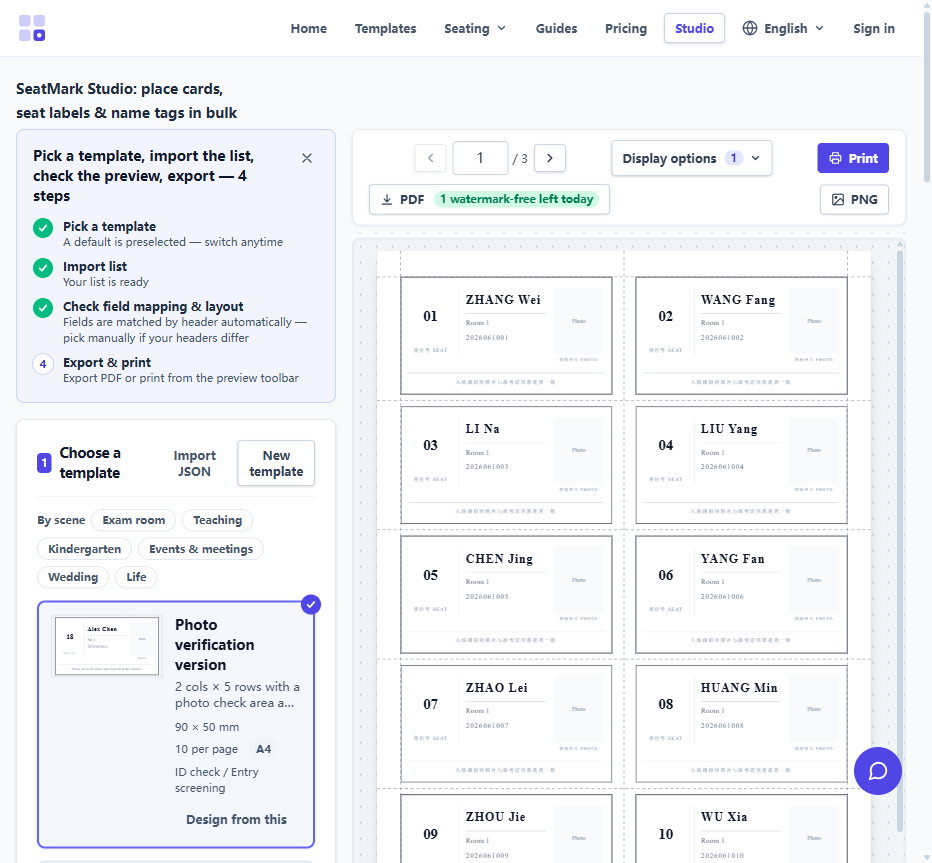
Pick a badge or ID-card template in the studio. Photo templates show portrait, name, ID and organisation; no-photo variants drop the portrait cleanly. Fonts, colours and layout are adjustable once in the designer — every badge in the batch updates together.
Step 3 — Import and verify
Upload the spreadsheet, then the photo folder. Photos pair to rows by file name; the data check then flags anything suspicious — a missing photo, a duplicate ID, an empty name cell — before a single page is printed.
Step 4 — Export and finish
Export the PDF: badges are imposed many-up on A4 with cut lines. Print at 100% scale on card stock, cut along the guides, and finish in badge holders or laminate. For large runs, the calibration wizard keeps the cut accurate to within 0.35 mm.
Why local processing matters here
Student photos and staff IDs are sensitive data by any standard. SeatMark parses the roster and renders every photo locally in the browser — nothing is uploaded, which also means the tool keeps working on flaky venue Wi-Fi once loaded.